
Box/row/column layout
In WebAcappella, elements are organized according to a specific structure:
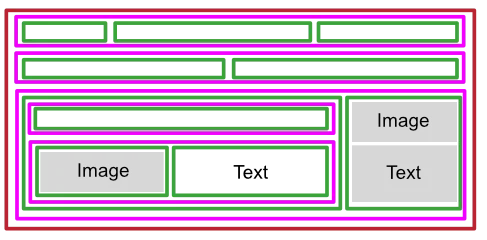
- Boxes are the main containers that structure the page.
- Rows are inserted directly into boxes and allow for horizontal organization.
- Columns are elements like any other (text, image, button) and must be dragged into a row to organize content vertically.
This hierarchy allows for flexible and adaptive layouts.
Color legend
In the WebAcappella interface, each element that structures the page is represented by a specific color:
- Brown for boxes.
- Pink for rows.
- Green for columns.
When an element is selected, it is surrounded by a border of the same color.
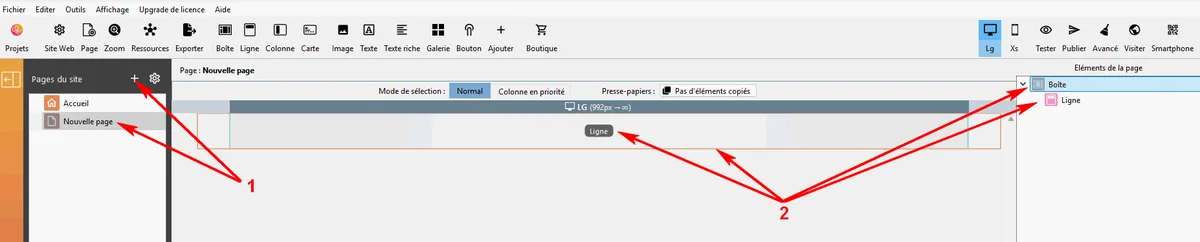
Create a new page
- Create a new page in WebAcappella.
- A box containing a line is automatically placed there.
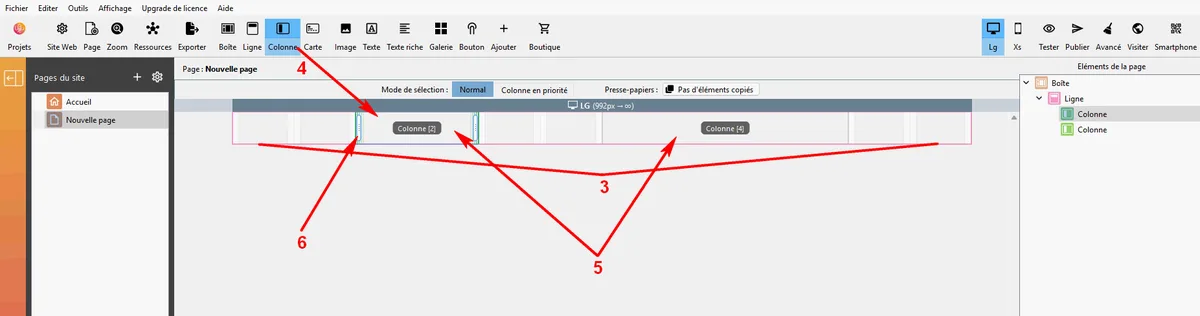
Add columns to a line
- Each row is divided into 12 sections, allowing you to easily adjust the width of the columns.
- Drag and drop one or more columns into the row.
- Repeat the operation to add several columns side by side.
- Resize the columns by adjusting their proportions.
- In each of the columns created, drag the desired elements (text, image, button, etc.) that will occupy the width of the column.
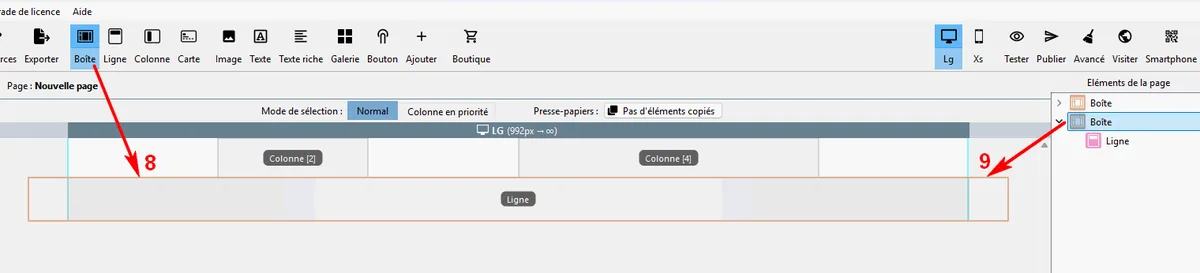
Add boxes and lines
- You can drag as many boxes as you need onto the same page.
Practical tips
- Use a clear structure by using several boxes to organize the page.
- Use columns to balance the layout, but avoid using too many so as not to overload the mobile display.
- Regularly test the responsive mode to ensure proper display on all screens.