Displaying text with browsers
It is currently impossible to have exactly the same rendering of a text box under the different existing browsers (Edge, Firefox, Chrome, Safari and Opera) and this, whatever the software you will use to create sites.
This is for various reasons:
Difference in CSS implementation by browsers
User settings (especially on mobile phones)
Management of the size which can change according to the browsers (the size is the strategy of cutting words when space is limited, this management is much more complex than it seems)
Several factors are therefore uncontrollable by the webdesigner
WebAcappella being a wysiwyg software, the text fields cannot automatically expand. It is therefore recommended to always leave a lower “margin” in case the text takes more space. The more the height of the zone is important, the more the difference can be important according to the navigators.
WaFx therefore contains an extremely important option, namely the checkbox display a button if the text does not appear in full
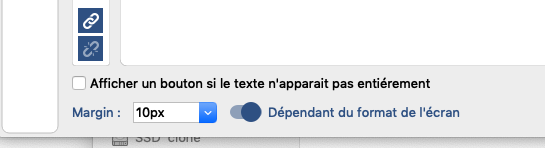
This option ensures that regardless of the browser, the visitor will be able to read your entire text area by clicking on the bottom arrow (this arrow only appears when your text area is too long).