The sound player
The Sound Player component lets you integrate an audio file into your WebAcappella site, allowing visitors to listen to sound directly from their browser.
Component presentation
The Sound Player is a component that plays MP3 audio files, ensuring compatibility with most modern browsers (Chrome, Firefox, Edge, Safari, etc.).
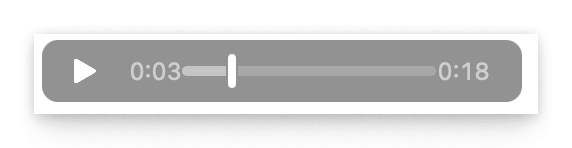
It displays a player with the classic controls: - Play/Pause - Progress bar - Volume control
The player adapts to different media (computer, tablet, mobile) to guarantee optimal listening.
Adding the component
To add a sound player to your site :
Open your WebAcappella project.
Go to the page where you want to insert the audio.
Click on Add a component and select Sound player.
Upload a MP3 file or specify a link to an external audio source.
Place the reader where you want it on the page.
Configuration and customization
Once the player has been added, several options are available:
Audio source: Add a MP3 file or enter an external URL.
Player display: Modify player width to match site design.
Autoplay : - ⚠ Caution: Autoplay is blocked by default on many browsers to avoid inconvenience to users. - To get around this restriction, we recommend displaying an explicit button asking the user to start playback.
Loop playback: Replay the file continuously.
Compatibility and recommendations
MP3 format recommended : The MP3 format is universally supported by all modern browsers.
Avoid Autoplay: Browsers often block autoplay. It’s better to offer a clear “Listen” button.
File size: Optimize MP3 file size to improve page load time.
Mobile compatibility: Test your player on different devices to check ergonomics.
Best practices
Add a short description of the audio to inform the user of the content to be listened to.
Check that audio does not start unexpectedly on mobile.
Offer an alternative in case of incompatibility (e.g. a link to download the MP3 file).
Troubleshooting
If the player does not work properly :
Make sure the MP3 file is downloaded and accessible.
Check that the audio file is not corrupted.
Test with another browser to check for incompatibility.
By following these recommendations, you guarantee optimal integration of audio on your WebAcappella site.