Writing website content isn’t always the most enjoyable part of the project. Finding the right tone, correcting a phrase, rewriting a paragraph that sounds off, optimizing for search engines… that’s often where we get stuck. Good news: an AI assistant is coming soon to WebAcappella Fusion, directly integrated into the editor—for both writing and SEO.
Why an integrated AI assistant?
These days, when you want to use AI to help you write content for your website, the process is always the same: you open another tab, go to ChatGPT or another tool, copy your text, describe what you want, get the result, go back to WebAcappella, and paste it. After ten back-and-forths, you’ve lost your train of thought.
The idea behind the built-in AI assistant is exactly the opposite: stay within the editor. You can edit the text you’re writing right there, with a single right-click, without switching applications or contexts.
Following on from DeepL, integrated since 2022
This isn’t the first time WebAcappella Fusion has leveraged an AI service to save you time. Since 2022, DeepL machine translation has been natively integrated into the editor: in just a few clicks, your site is available in multiple languages, without copying and pasting or switching back and forth to an online translator. Many multilingual sites have been translated since then, with a quality that users love.
The AI assistant follows the same logic: taking the best services on the market and seamlessly integrating them into your workflow, not in a separate tab. DeepL for translation, the assistant for writing and proofreading—two complementary tools, two forms of assistance based on the same idea: saving you time without ever leaving WebAcappella.
Features at launch
For this first version, we’ve focused the assistant on the needs that come up most often when building a website:
1. Generate text from an idea
Do you have a blank page and don’t know where to start? Describe in one sentence what you want to say, and the assistant will draft a first version that you can then edit. Typical uses: a homepage intro, a product description in your store, a team bio, an “About” section.
2. Check spelling and grammar
An instant proofread of your text, without leaving the editor. Spelling, verb agreement, punctuation: the AI suggests a corrected version that you can accept or reject. Perfect right before publishing, or for long paragraphs you’ve read over ten times without catching a typo.
3. Rephrase and adjust the tone
Is your text correct but doesn’t sound quite right? Request a rephrasing tailored to your audience:
- more formal — for a corporate website or a law firm
- shorter — to get to the point on a landing page
- more sales-oriented — for a product page or an offer
- more accessible — to explain a technical subject in layman’s terms
- more professional — for a B2B context
The original text remains displayed next to the suggestion: you compare and choose.
4. Audit and optimize your page’s SEO
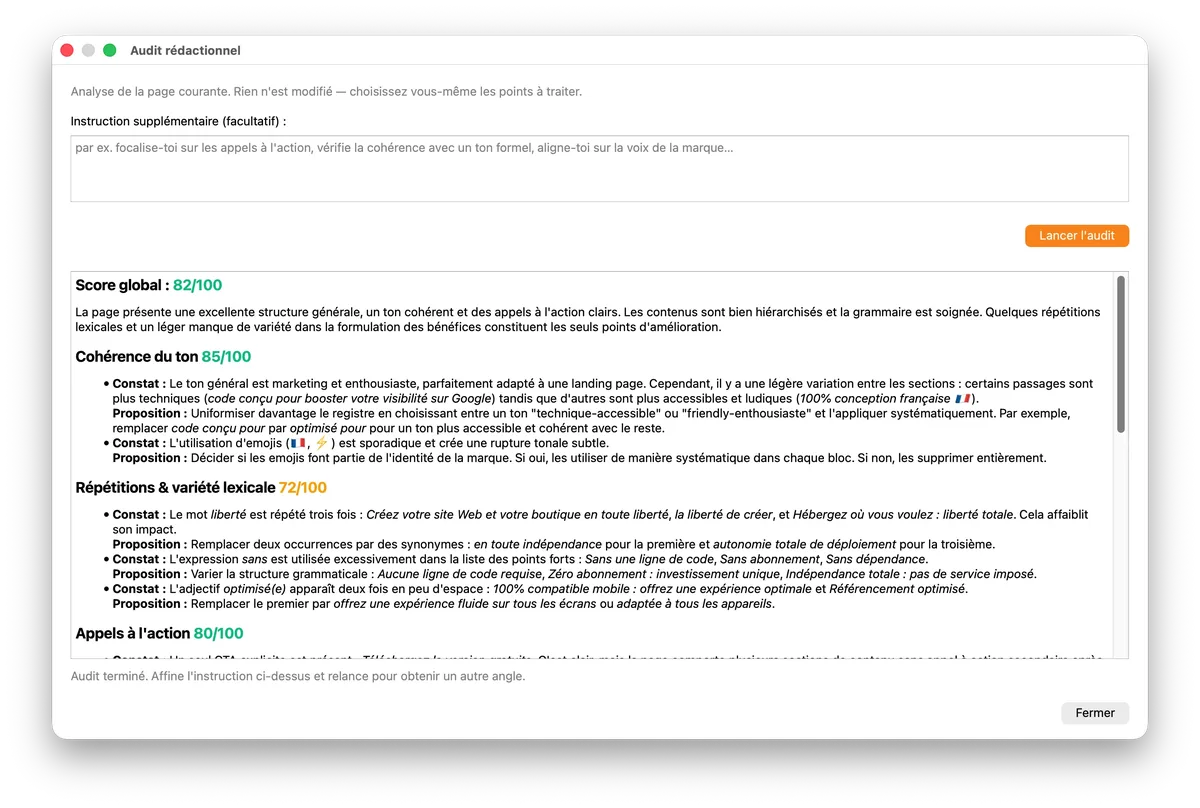
Before publishing a new page, a comprehensive SEO audit runs a thorough check: keyword density and relevance, content length, readability. The assistant highlights what might be holding back your SEO and suggests concrete ways to improve, page by page.
Better yet: the assistant can directly generate an optimized page title and meta description by analyzing the entire content. These are two critical elements for SEO—yet they’re often overlooked or left blank due to a lack of inspiration at the time of publishing. You get a ready-to-use suggestion that you can keep as is, tweak, or regenerate.
Two levels of intervention
Depending on what you want to edit, the assistant adapts to two different scopes:
On a specific text area
Select a title, a paragraph, or a button. Right-click, then choose the action: generate, correct, or rewrite. The assistant only affects the selection—the rest of the page remains intact. Ideal for a one-off adjustment without disrupting the balance of the content.
On the entire page
Need to rework an entire page at once? A dedicated menu provides access to global actions: general correction, consistent rephrasing of all text, SEO audit that evaluates the page as a whole, and automatic title and meta description suggestions based on the analyzed content. Useful before publishing, or to standardize the tone of a page written in multiple sessions.
AI doesn’t replace your writing: it assists you. You always have the final say, and every suggestion is approved before being applied to the text.
A monthly subscription, with no surprises
The AI assistant relies on external language models (the very same ones behind the best AI tools on the market). Each request therefore incurs a real cost for us, which we cannot absorb indefinitely within the license. That’s why the assistant will operate as a fixed-price monthly subscription: you know exactly what you’re paying, with no usage meter to monitor and no unpleasant surprises at the end of the month.
Users who prefer not to use AI don’t need to do anything: the classic text editor remains exactly as it is today. The assistant is an option, not a requirement.
The exact subscription price and terms of service will be announced at the time of the official release.
Coming soon
The AI assistant is currently in the final stages of development. We’re working on fine-tuning the last details of the interface and stabilizing the integration with the AI models. An official announcement will follow on this blog as soon as the feature is available in a WebAcappella Fusion update.
In the meantime, if you have feedback on AI features you’d like to see included in future versions (beyond generation, correction, and rephrasing), please feel free to reach out to us—your feedback directly guides our priorities.